

Contents

In a nutshell:
Would you like to automate a process using AI? We’ll show you how, step by step. With linqi, you can easily map out your workflows and automate them with just a few clicks. Once set up, the software takes care of the rest for you. For example, the AI can extract data from emails or documents, check it and forward it to the right place. This means you no longer need to enter the same information manually multiple times. Let’s get started with this guide. Our recommendation: it’s best to start with a task you encounter every day and implement this first process using AI.

Process automation with AI: How to get started

Would you like to automate a process using AI, but aren’t sure how to begin? Our tip for the first step: start by selecting a task that occurs regularly in your day-to-day work and whose workflow you know well.

Then go through the individual steps: Where does the process begin? Who are the people involved, or which programmes are required? What information needs to be transferred from where to where? Does it need to be read, checked, sorted or passed on? These points can provide a good indication of where AI can be a helpful support.

Once you’ve selected a process you’d like to automate and have thought through how it works, you can easily map it out in the Process Designer using linqi’s modular system. But don’t worry – we won’t leave you to it on your own.

You can set up your first process together with us. We’ll prepare your sample process and show you how linqi works and where AI can be applied. After that, you can create further processes yourself and adapt them to your workflows.

Simply drop us a quick line telling us which process you’d like to automate and what steps you’ve taken so far. In just 30 minutes, we’ll show you how the workflow can be implemented and how AI is used within it.

More on process automation with linqi


Step 1: Choosing the right process for AI automation

First of all, the question is: which process is best to start with? Ideally, it should be a workflow that occurs regularly, involves a lot of manual work and is fully understood from a technical perspective. Processes in which staff search for information, read documents, check content, transfer data or pre-sort tasks are particularly interesting. This is often where the greatest potential for process automation with AI lies.

A good first use case doesn’t necessarily have to be large. A manageable process is often actually the better choice when getting started with AI-driven process automation. Benefits, sources of error and special cases can be assessed more quickly here and taken into account during digitalisation.

Before automating a process using AI for the first time, it is helpful to ask the following questions:

  • How often does the process run?
  • Which steps are particularly time-consuming?
  • Which decisions follow clear rules?
  • Where is there free-text, documents or other unstructured information?
  • Which systems and people are involved?

Tip:
Answer some of these questions in a few short sentences by email. We can then map out your process in linqi on a trial basis and discuss with you how the individual steps can be automated using AI. This is non-binding and based on your specific example.

An example:
A company processes internal procurement requests, such as for ordering workwear. Employees fill in a form with fields they’ve previously customised and submit their requirements with a click of the mouse.

The request is automatically forwarded to the person responsible and pops up as a message on their screen. All the key details are already included. In addition, they receive a cost breakdown, can view previous procurement requests and see who is next in line or which approvals are still pending – all in real time and at a glance.

The person responsible for approval then simply needs to confirm the request. The ordering process is then triggered automatically.

In this specific example, there are several potential areas for digital process automation. And these now need to be identified.

Step 2: Map out the existing workflow

Before even considering process automation using AI, it should be clear how the process actually unfolds in day-to-day work – not how it should run in an ideal scenario. This includes the start and end points, the information required, the people involved, approvals, rules, exceptions and existing IT systems.

For the example process, the questions might be answered as follows:

The procurement request is submitted several times a week. The review stage is particularly time-consuming: Are all the details provided? What was last ordered? What are the associated costs? Reminders are usually needed several times to get the request approved. Consequently, there is frequent back-and-forth communication.

The decision follows clear rules, for example regarding the threshold above which additional approval is required. There is a free-text field for describing the requirement. Documents such as quotations or product information can also be attached to the request.

Those involved include the applicant, the person responsible for procurement and, where applicable, a further person for approval. The systems used are the form in linqi, the existing cost overview and the previous order history.

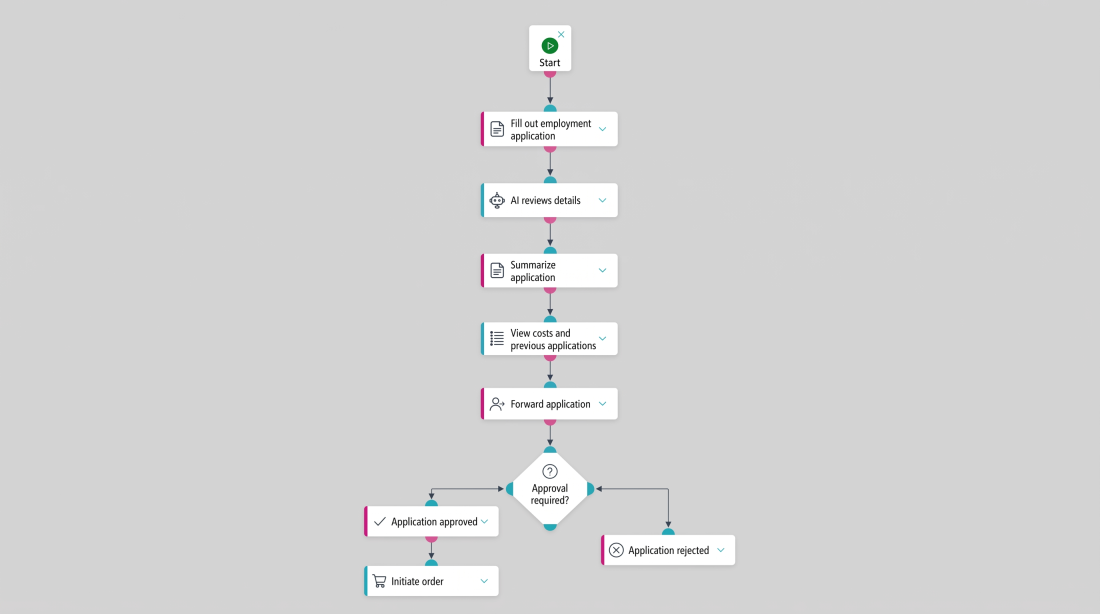
This allows steps 1 and 2 to be seamlessly integrated. At the end of this ‘initial phase’, the summarised process flow – initially as bullet points on paper or in an email and subsequently mapped out in linqi – might look like this:

  1. Complete the procurement request form
    Staff enter what they need, in what quantity and for whom. Free-text fields can be used, for example, to specify size, colour or a brief justification.
  2. Check details
    An AI module reads the request and checks whether any key information is missing. Attached documents can also be taken into account.
  3. Summarise the request
    The key details are summarised clearly. These include the requirement, the estimated costs and similar previous requests.
  4. Forward the request
    The request is automatically displayed to the relevant person. They can see at a glance what the request is about, what the costs will be and what the next step is.
  5. Check for approval
    If approval is required, the relevant person receives a notification. They can approve or reject the application.
  6. Initiate the order
    If the request is approved, the next step in the ordering process is automatically triggered. If it is rejected, feedback is sent to the person who submitted the request.

Step 3: Decide what the AI should do – and what it shouldn’t

The process is in place. Now the AI can do the work – or can it? Not quite yet. Good AI automation only uses artificial intelligence where it offers a genuine advantage over a fixed rule. Anything that can be clearly defined using conditions, responsibilities or thresholds should be automated using rules. This makes the results more predictable and ensures the process remains reliably controllable.

In our example, the AI can analyse a freely worded requirements specification, extract content from an attached document or assign the request to a procurement category. The subsequent approval logic – for example, based on amount, cost centre or organisational unit – can be controlled by linqi via fixed rules.

AI alone cannot be used to automate robust end-to-end processes. For genuine AI workflow automation, you also need sound process logic, clear roles and rules, as well as interfaces, documentation and defined responses to different outcomes. linqi provides this overarching framework.

Step 4: Build a small proof of concept

Before the new AI workflow is rolled out across the entire organisation, it should be tested using realistic scenarios. A proof of concept does not yet need to replicate the full future process. However, it should demonstrate whether the chosen approach works from a technical perspective.

What questions should a proof of concept in AI automation answer?

A proof of concept within an AI automation project should answer three questions:

  • Does the AI deliver sufficiently good results in my use case?
  • Does it integrate effectively with the rest of the process?
  • Does it actually reduce the workload for staff?

Clear criteria are needed in advance to answer these questions. In the procurement example, these could include the correct assignment of categories, the proportion of data fully recognised, the processing time or the number of manual corrections required.

linqi offers a test and preview function for this purpose, which allows the process to be run through on a trial basis. This enables a process to be tested, adjusted and, if necessary, reset to its previous state before it goes into regular operation.

Step 5: Set up the AI workflow with clear checkpoints

No matter how intelligent the automation may be, the AI should not be left to make certain decisions on its own. Particularly for important or sensitive processes, it is essential to define from the outset when a result may be processed automatically and when a human must review it again.

A practical rule of thumb could be: if the AI’s classification is unambiguous and all mandatory details are present, the process continues automatically. If information is missing or the result falls outside a defined range, linqi creates a task for the relevant person.

This creates automated workflows based on transparent criteria. The AI processes complex content. linqi ensures clear workflows, responsibilities and escalation procedures. However, control always remains with a designated member of staff – a ‘human-in-the-loop’.

Step 6: Testing special cases and borderline cases

Once the trial run has been successful, it’s time to tackle the special cases. How well the automation works is often determined by cases that cause difficulties in day-to-day work: incomplete details, unusual phrasing, incorrect file formats, duplicate applications, unclear responsibilities or contradictory information.

That is why business users should test these cases at an early stage. They are familiar with the exceptions that are easily overlooked in technical designs. At the same time, this allows them to observe whether the AI-driven process optimisation actually saves time or merely shifts the workload elsewhere.

Step 7: Roll out, measure and optimise the process

Once the process is running stably from a technical perspective, the next phase begins. In linqi, it is easy to identify the following aspects of the automated process: Which steps still take how long? Where is manual intervention frequently required? Which exceptions occur more often than expected?

linqi provides process data and analysis tools for evaluating the automation. This reveals patterns that can easily be overlooked in day-to-day operations. On this basis, the workflow can be further developed in a targeted manner.

Only once the workflow is stable should you move on to the next manual process, at which point automation can be scaled up. Experience shows that it makes more sense to set up a few AI workflows properly and learn from them, rather than launching many projects simultaneously. The approach remains clear: select a use case, understand the process, integrate AI in a targeted manner, test, measure and roll out.

Automate your first process now


AI in public administration: A pragmatic approach to getting started

The same applies to AI in public administration: processes are particularly suitable where staff regularly search for, read, categorise or check large volumes of information for completeness.

Possible use cases include the pre-structuring of incoming public enquiries, the review of documents in internal procedures, or the preparation of verification and approval stages. AI can capture, summarise or categorise content. The technical decision and the process logic remain with the relevant staff members.

A step-by-step approach is particularly important for public administrations: first identify a specific use case, then test its suitability in a limited proof of concept, and only then scale it up. A major advantage in day-to-day work: with linqi, specialist departments can work on process digitalisation themselves, without having to pass every adaptation on to IT as a traditional development project.

Arrange a no-obligation consultation


Three prerequisites for successful AI automation

Only by understanding the typical reasons why AI automation fails can you address them at an early stage and specifically eliminate them. With linqi, some of these problems do not even arise in the first place.

Prerequisite for success 1: Bringing together subject matter expertise and implementation

The translation between subject matter expertise and technical implementation often proves complicated: the business department understands the process but cannot always formulate the requirements in technical terms. IT, on the other hand, understands the systems but lacks the same depth of subject matter expertise regarding the specific process.

linqi’s no-code approach bridges this gap. When business users can model, test and modify processes themselves, process knowledge is directly translated into functioning workflows.

Prerequisite for success 2: Creating scope for action

A second point is the mandate. Those tasked with improving processes must also be allowed to change them. If clear responsibilities or the necessary scope for decision-making are lacking, even the best AI integration will remain stuck at the pilot stage.

Prerequisite for success 3: A positive culture of error

Automation needs room to experiment. A proof of concept is not yet a finished product. Anyone who expects the first AI workflow to handle every special case perfectly straight away is preventing the learning loops that are necessary for a robust solution.

Conclusion: Start with a process, not with AI

Anyone wishing to automate processes with AI first needs a sound process, followed by the correct division of tasks between AI and automation. Artificial intelligence is well suited to understanding, structuring and evaluating information. linqi combines these capabilities with clear rules, responsibilities, approvals, interfaces and a traceable workflow.

The best way to get started with process automation using AI should therefore be deliberately small and simple: select a relevant use case, map out the workflow clearly, integrate AI where appropriate, and test the result with real-world cases. Once this model works, it can be applied to other processes within businesses, public administrations and other organisations. Once you have been guided by the linqi team, you can set up further processes yourself and save time.

FAQ: Process automation using AI

Request a free live demo

After a preliminary discussion of approx. 30 minutes, we will automate your process free of charge and demonstrate linqi to you using your own process in a live demo via video call (approx. 60 minutes) to clarify any open questions.

Request Live-Demo

More Posts

Unternehmensdigitalisierung
20.07.2026
What is ‘business digitalisation’?

Business digitalisation involves the automation of business processes and the creation of a digital workplace, making operations more efficient and flexible. It helps companies improve their communication, automate tasks and optimise [...]

What is ‘business digitalisation’?